



0 ratings
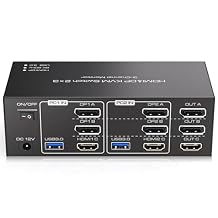
HDMI Displayport KVM Switch 3 Monitors 2 Computers 8K@60Hz 4K@120Hz USB 3.0 DP KVM Switch for 2 PC Share Multi Monitor and 4 USB Devices Included Support Extended & Copy Mode
Support Ultra HD 8K resolution and share 4 USB 3.0 ports across multiple computers effortlessly.
HDMI Displayport KVM Switch 3 Monitors 2 Computers 8K@60Hz 4K@120Hz USB 3.0 DP KVM Switch for 2 PC Share Multi Monitor and 4 USB Devices Included Support Extended & Copy Mode
Item #: 144887918

HDMI Displayport KVM Switch 3 Monitors 2 Computers 8K@60Hz 4K@120Hz USB 3.0 DP KVM Switch for 2 PC Share Multi Monitor and 4 USB Devices Included

Item #: 144887918

IMP 66

Price Details

Excluding Shipping & Custom charges ( Shipping and custom charges will be calculated on checkout )

*All items will import from US

0 ratings Write a review
In stock
us Imported from USA store

QTY:

Order now and get it around Saturday, July 11
Our Top Logistics Partners
  • fedex
  • dhl
Support Ultra HD 8K resolution and share 4 USB 3.0 ports across multiple computers effortlessly.
U-Care Warranty:
None
Select a Plan
fast shipping

Fast
Shipping

free return

Free
Return*

secure packaging

Secure Packaging

100% original products

100% Original Products

pci-dss

PCI DSS Compliance

iso certified

ISO 27001 Certified


paypal payment
visa payment
mastercard payment
Note: Step Down Voltage Transformer required for using electronics products of US store (110-120). Recommended power converters Buy Now.

What Stands Out

High Resolution Support
Experience breathtaking visuals with 8K@60Hz and 4K@120Hz support, ensuring vibrant and crisp displays across multiple monitors for gaming, streaming, and professional work.
Multi-Monitor Control
Effortlessly manage three monitors across two computers, allowing seamless multitasking and enhanced productivity, whether for work or entertainment.
USB Device Sharing
Connect and share up to four USB devices between computers, streamlining your setup and reducing cable clutter, perfect for efficient workflows and easy access.

Product Details

Shop HDMI Displayport KVM Switch 3 Monitors 2 Computers 8K@60Hz 4K@120Hz USB 3.0 DP KVM Switch for 2 PC Share Multi Monitor and 4 USB Devices Included Support Extended & Copy Mode online at a best price in Isle of Man. B0FB3QD96F
Item Weight3 lbs (1.36 kg)

Who Should Buy?

Suitable For
  • Gamers

    Ideal for gamers requiring high-resolution capabilities for multiple displays, enhancing their gaming experience significantly.

  • Professionals

    Great for graphic designers or video editors who need to use multiple monitors for better workflow and productivity.

  • Tech Enthusiasts

    Perfect for tech enthusiasts wanting to connect two PCs and four USB devices with seamless switching between setups.

Not Suitable For
  • Casual Users

    Not suitable for casual users needing basic connectivity without the complexities of managing multiple devices and monitors.

  • Budget Shoppers

    May not fit budget-conscious individuals who require a simpler, less expensive solution for their multi-display setup.

  • Single Monitor Users

    Not beneficial for users who only utilize a single monitor, as they won't make use of multi-monitor capabilities.

Product Description

HDMI Displayport KVM Switch 3 Monitors 2 Computers 8K@60Hz 4K@120Hz USB 3.0 DP KVM Switch for 2 PC Share Multi Monitor and 4 USB Devices Included Support Extended & Copy Mode

Have any Query? Chat with us

Customer Questions & Answers

  • Question: What is an HDMI Displayport KVM Switch used for?

    Answer: An HDMI Displayport KVM Switch allows users to control multiple computers with a single set of peripherals—keyboard, mouse, and monitors. This device is particularly beneficial for professionals who need to operate two systems simultaneously and switch between them effortlessly. With support for up to three monitors, it enhances productivity by providing a larger workspace. For instance, graphic designers or video editors can monitor multiple applications side by side, maximizing their efficiency.
  • Question: How do you connect the HDMI Displayport KVM Switch to multiple computers?

    Answer: Connecting the KVM switch is straightforward; simply connect each computer’s HDMI or DisplayPort output to the KVM switch's corresponding input ports. Then, connect your monitor(s) to the output ports and the USB peripherals to the designated USB ports. This setup allows seamless switching between your connected devices, facilitating a hassle-free multi-computer operation. This is ideal for users who might need to access different workstations without the clutter of multiple sets of peripherals.
  • Question: What resolutions does this KVM Switch support?

    Answer: This KVM switch supports impressive resolutions up to 8K at 60Hz and 4K at 120Hz, making it perfect for high-performance tasks such as gaming, video editing, and design work. This high resolution ensures that you enjoy crisp, clear images across all three connected monitors, enhancing visual quality. For example, gamers can experience the most detailed graphics while streaming content across multiple displays without sacrificing performance.
  • Question: Can I use this KVM switch for gaming?

    Answer: Yes, this KVM switch is ideal for gaming due to its support for up to 8K@60Hz and 4K@120Hz resolutions, ensuring you experience stunning visuals. It allows you to switch between gaming PCs or consoles with ease, without needing to change cables or input settings manually. Gamers can leverage this by having a dedicated gaming setup while also accessing their work computer when needed, making it a versatile choice for multitasking.
  • Question: Does the KVM switch support audio output?

    Answer: Yes, this KVM switch supports audio output from the connected devices, enhancing your multimedia experience. You can enjoy high-quality sound alongside the video displayed on your monitors, making it suitable for various applications such as watching movies, gaming, or video conferencing. This is particularly useful when switching between different activities, allowing you to maintain audio continuity without the need for additional equipment.
  • Question: How many USB devices can I connect to the KVM switch?

    Answer: The KVM switch comes equipped with four USB ports, allowing you to connect multiple USB devices such as printers, external drives, or webcams. This capability helps streamline your setup by minimizing clutter and permitting easy access to essential devices without switching cables frequently. For example, users can connect their keyboard, mouse, and additional peripherals like a USB drive, all routed through the KVM to make transitioning between computers seamless.
  • Question: Is it compatible with both Mac and Windows computers?

    Answer: Yes, this KVM switch is designed to be compatible with both Mac and Windows systems, making it a versatile option for users with different types of computers. This compatibility means you can easily switch inputs between a Windows gaming PC and a Mac for design work without any operational hitches. This flexibility is ideal for professionals and enthusiasts who work across different operating systems.
  • Question: Can I use this KVM switch with more than two computers?

    Answer: This particular KVM switch is specifically designed for two computers. However, multiple KVM switches can be daisy-chained if you need to operate more devices, but that may complicate your setup. For users needing to manage three or more computers, consider using additional KVM switches to preserve ease of access. This setup is useful for IT professionals managing several systems for testing or development purposes.
  • Question: What is the average switch time between PCs?

    Answer: The average switch time between PCs using this KVM switch is typically just a few seconds, allowing for quick transitions without delays. This is particularly beneficial for users who need to alternate between systems for tasks like live streaming while gaming or coding while accessing design applications. Fast switching ensures you maintain workflow continuity and enhances productivity.
  • Question: Where can I buy the HDMI Displayport KVM Switch in Isle of Man?

    Answer: You can purchase the HDMI Displayport KVM Switch from Ubuy, which provides a reliable online shopping platform with a wide selection of electronic products. Ubuy offers convenient access to this KVM switch, along with detailed product information and customer reviews, ensuring you make an informed choice. Browse Ubuy to take advantage of their user-friendly interface and seamless purchasing experience.

TJCXELE KVM Switches Editorial Review

No editorial reviews found

Customer Reviews & Ratings

5.0
1 customers ratings
  • 5 Star
    100%
  • 4 Star
    0%
  • 3 Star
    0%
  • 2 Star
    0%
  • 1 Star
    0%

Review this product

Share your thoughts with other customers

Platform Trust & Buyer Confidence

trustpilot logo
4.3/5 9,000 + reviews
Read reviews
MT
Mohd
Verified buyer

“The product received very good packaging & safe…Thank You”

16 June 2026 · via Trustpilot
SJ
Shawati
Verified buyer

“Accurate delivery timing given”

16 June 2026 · via Trustpilot
YB
Youcef
Verified buyer

“Not madly expensive like I thought, and much quicker than promised.”

15 June 2026 · via Trustpilot
LM
Leila
Verified buyer

“Never dealt with Ubuy before, but everything worked out great. Seamless cross border purchasing and shipping. Thanks!”

6/7/2026 · via Trustpilot
KA
Kwame
Verified buyer

“The process was smooth, with clear communication and timelines. This was my 1st purchase and I am really impressed. I will definitely be coming back.”

12 June 2026 · via Trustpilot
Secure Checkout Global Delivery Easy Returns Genuine Products

Product Price History

Important information

  • Limitations : For products shipped internationally, please note that any manufacturer warranty may not be valid; manufacturer service options may not be available; product manuals, instructions, and safety warnings may not be in destination country languages; the products (and accompanying materials) may not be designed in accordance with destination country standards, specifications, and labeling requirements; and the products may not conform to destination country voltage and other electrical standards (requiring use of an adapter or converter if appropriate). The recipient is responsible for assuring that the product can be lawfully imported to the destination country. When ordering from Ubuy or its affiliates, the recipient is the importer of record and must comply with all laws and regulations of the destination country.
  • Not all the products listed on Ubuy are for sale, as Ubuy is a global search engine. Products are subject to export/trade regulations.