- Home Page /
- Office Products /
- Office Electronics /
- Printers & Accessories /
- Computer Printers /
- Inkjet Computer Printers /
- Ink Tank Printers /
- CNMMG3620BK - Canon PIXMA MG MG3620 Inkjet Mu...
0 ratings




Item #:
88002132
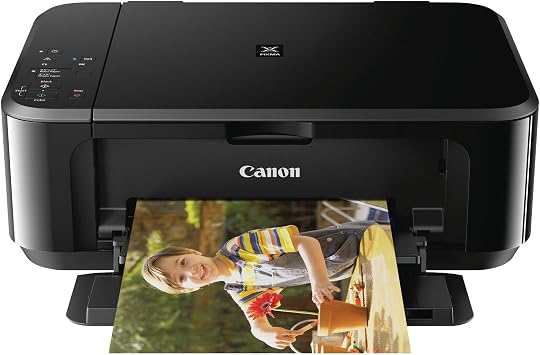
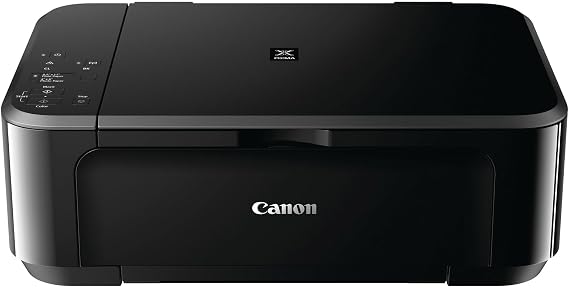
CNMMG3620BK - Canon PIXMA MG MG3620 Inkjet Multifunction Printer - Color
85% of respondents would recommend this to a friend
Item #:
88002132
IMP 148
Price Details
Excluding Shipping & Custom charges ( Shipping and custom charges will be calculated on checkout )
*All items will import from US
0 ratings
Write a review
In stock
 Imported from USA store
QTY:
Only 4 items left in stock.
Order now and get it around Thursday, October 01
Secured transaction
Ubuy works hard to protect your security and privacy. Our advanced payment security system ensures confidentiality by encrypting your information during transmission using AES (Advanced Encryption Standards) and SSL (Secure Socket Layer) protocols. Your payment details are 100% secure as we do not share your payment details with third party sellers.
Our Top Logistics Partners


Print documents and web pages with fast speeds and vibrant colors.

Fast
Shipping

Free
Return*

Secure Packaging

100% Original Products

PCI DSS Compliance

ISO 27001 Certified



Note: Step Down Voltage Transformer required for using electronics products of US store (110-120). Recommended power converters Buy Now.


Product Details
| Product Dimensions | 17.7 x 12 x 6 inches (45 x 30.5 x 15.2 cm); 11.9 pounds (5.4 kg) |
| Item model number | MG3620 |
| Date First Available | May 24, 2016 |
| Manufacturer | Canon, Inc |
| Printer Type | Inkjet |
| Other Special Features of the Product | Auto-Duplex, Color Print Capability, Energy Star, Wi-fi |
| Printer Output Type | Color |
| Item Weight | 11.9 pounds (5.4 kg) |
| Item Dimensions D x W x H | 6"D x 17.7"W x 12"H (15.2 x 45 x 30.5 cm) |
| Controller Type | Android |
| Print media | Envelopes, Glossy photo paper, Paper (plain) |
| Scanner Type | Flatbed |
| Compatible Devices | Smartphones, Tablets |
| Ink Color | Black |
| Additional Printer Functions | All In One |
| Control Method | App |
| Number of Trays | 1 |
| Resolution | 4800 x 1200 |
| Brand | Canon |
| Model Name | PIXMA MG |
| Model Number | MG3620 |
| Built-In Media | PIXMA MG3620 Wireless Inkjet All-In-One Printer |
| Model Series | PIXMA |
| Specific Uses For Product | Office, General Use |
| Unit Count | 3.6 pound |
| Item Type Name | Inkjet Multifunction Printer |
| Maximum Media Size | Envelope No. 10 - 4.80" x 9.50", Photo - 4" x 6", 5" x 7", Legal - 8.50" x 14", Letter - 8.50" x 11" |
| Maximum Sheet Capacity | 100 |
| Paper Size | 4.80 x 9.50, 4 x 6, 5 x 7, 8.50 x 14, 8.50 x 11 |
| Color | Black |
| Maximum print Resolution Color | 4800 x 1200 dots_per_inch |
| Maximum Print Resolution Black and White | 4800 x 1200 dpi |
| Printer Connectivity Type | USB, Wireless |
| Hardware Interface | USB |
| Total Usb Ports | 1 |
| Duplex | Automatic |
| Maximum Copy Resolution Color | 4800 x 1200 dpi |
| Maximum Copy Resolution Black and White | 4800 x 1200 dpi |
Product Description
Have any Query? Chat with us
Customer Questions & Answers
-
Question:
What are the key features of the Canon PIXMA MG3620 Printer?
Answer: The Canon PIXMA MG3620 is a versatile wireless inkjet multifunction printer that offers printing, scanning, and copying capabilities. It supports mobile printing via AirPrint and Google Cloud Print, making it ideal for users who require flexibility in printing from various devices. Additionally, its compact design suits small spaces, while its color printing can produce vibrant documents and photos. This printer is perfect for home or small office use, accommodating diverse printing needs like school projects, photo prints, and everyday documents. -
Question:
How do I connect the Canon PIXMA MG3620 to Wi-Fi?
Answer: To connect the Canon PIXMA MG3620 to Wi-Fi, use the built-in wireless setup utility located on the printer's control panel. Simply select your Wi-Fi network from the available list, enter the password, and the printer will connect. Once connected, download the Canon PRINT app on your smartphone to manage print jobs seamlessly. This wireless connection allows you to print from anywhere within your home network, making it convenient for multi-device households. -
Question:
What types of paper can I use with the Canon PIXMA MG3620?
Answer: The Canon PIXMA MG3620 supports a variety of paper types including plain paper, photo paper (glossy and semi-glossy), and envelopes. You can use standard sizes like letter and A4, as well as custom sizes for your printing demands. These options allow for versatility, whether you're printing documents for work, crafting beautiful photo prints, or sending personalized notes. By choosing the right paper type, you can enhance the print quality and appearance of your projects. -
Question:
Can I print photos directly from my smartphone using the MG3620?
Answer: Yes, you can print photos directly from your smartphone with the Canon PIXMA MG3620. With AirPrint for iOS devices and the Canon PRINT app for Android devices, you can easily select images from your photo gallery and send them to print wirelessly. This feature is particularly useful for preserving memories, allowing you to print professional-quality photos directly from your mobile devices without the need for a computer. -
Question:
What ink cartridges are compatible with the Canon PIXMA MG3620?
Answer: The Canon PIXMA MG3620 uses two types of ink cartridges: the Canon PG-245 black ink cartridge and the CL-246 color ink cartridge. These cartridges are available in standard and XL sizes, providing options based on your print volume needs. Using original Canon cartridges ensures optimal print quality and performance, whether you’re printing lengthy documents or vivid photographs. Plus, purchasing XL cartridges can minimize the frequency of replacements for extensive printing tasks. -
Question:
Does the Canon PIXMA MG3620 support duplex printing?
Answer: No, the Canon PIXMA MG3620 does not support automatic duplex printing. However, you can manually print on both sides by printing one side and reinserting the paper to print the other side. This method allows you to save paper, especially useful for projects that require multiple pages or documents that need to be double-sided for a professional appearance. -
Question:
How can I troubleshoot printing issues with my MG3620?
Answer: If you experience printing issues with your Canon PIXMA MG3620, start by checking the printer's connection to your Wi-Fi and ensuring it is powered on. If the printer is not responding, restart both the printer and your computer or mobile device. Additionally, ensure there are no paper jams and that ink levels are sufficient. The printer's LCD panel can provide error messages that will guide you in resolving common issues quickly. Keeping the printer's software updated can also prevent technical glitches. -
Question:
Is the Canon PIXMA MG3620 suitable for home office use?
Answer: Absolutely! The Canon PIXMA MG3620 is an excellent choice for home office use due to its multifunction capabilities, compact size, and wireless connectivity. It can efficiently handle various tasks such as printing invoices, scanning documents, and copying important papers. Its color printing capabilities make it suitable for producing high-quality presentations and reports, ensuring you maintain a professional appearance in all your printed materials. -
Question:
How do I scan documents using the Canon PIXMA MG3620?
Answer: To scan documents using the Canon PIXMA MG3620, place the document face down on the scanner bed and initiate the scanning process via the printer's control panel or through the Canon PRINT app on your device. You can choose between scanning to a computer or sending it directly to email. The scanned files can be saved in various formats, allowing for easy sharing or storage. This feature is beneficial for digitizing important paperwork or creating backups of physical documents. -
Question:
Where can I buy Canon PIXMA MG3620 Wireless Inkjet Multifunction Printer - Color?
Answer: You can buy the Canon PIXMA MG3620 Wireless Inkjet Multifunction Printer - Color from Ubuy in Isle of Man. Ubuy offers a wide selection of electronic products, including printers, ensuring a reliable shopping experience with various options for customers.
Canon Ink Tank Printers MG3620 Editorial Review
CNMMG3620BK - Canon PIXMA MG MG3620 Inkjet Multifunction Printer - Color offers a compact design and versatile functionality, featuring Wi-Fi connectivity and auto-duplex printing. Users have praised its reliability, with many returning for multiple units due to their satisfaction with its performance over the years. However, some have expressed concerns about the Wi-Fi setup, finding it challenging with modern routers. Despite its minor drawbacks, such as being slightly noisy during operation, the MG3620 is enjoyed for its straightforward operation, making it an excellent choice for daily use in homes and offices. Its multifunction capabilities make it advantageous for various printing tasks.
Customer Reviews & Ratings
136 customers ratings
-
5 Star
60%
-
4 Star
18%
-
3 Star
5%
-
2 Star
6%
-
1 Star
11%
Review this product
Share your thoughts with other customers
Pros
- Compact and lightweight design for easy placement
- Reliable performance favored by repeat users
- Versatile printing options including double-sided
- Compatible with smartphones and tablets for convenience
- Great for basic and everyday printing needs
Cons
- Setup can be complicated with modern Wi-Fi routers
Platform Trust & Buyer Confidence

JK
Jasmin
Verified buyer
“Great products and very good service: very easy and very fast international delivery.”
9 September 2026 · via Trustpilot
AG
Anke
Verified buyer
“Wonderful online shopping experience, smooth transaction from the start. Payment method works conveniently and delivery is unexpectedly fast and reliable. You go the extra mile for service. What makes this even more amazing, you deliver to Namibia. I will remain a happy Ubuy customer and will increase my purchases for sure! Thank you!”
10 September 2026 · via Trustpilot
H
Hazel
Verified buyer
“Very easy to find the products what you need, and so fast delivery, that’s why I highly recommended to others costumers to used ubuy.”
10 September 2026 · via Trustpilot
O
Opaleye
Verified buyer
“I received exactly what I ordered I was skeptical about your site because that was my first time to order. But the order came timely and neatly packaged. I was not disappointed. Thank you.”
11 September 2026 · via Trustpilot
AC
Adele
Verified buyer
“Easy to find and order what you want on the website. Delivery is quick to the UK”
8 September 2026 · via Trustpilot
Secure Checkout
Global Delivery
Easy Returns
Genuine Products
Product Price History
Important information
- Limitations : For products shipped internationally, please note that any manufacturer warranty may not be valid; manufacturer service options may not be available; product manuals, instructions, and safety warnings may not be in destination country languages; the products (and accompanying materials) may not be designed in accordance with destination country standards, specifications, and labeling requirements; and the products may not conform to destination country voltage and other electrical standards (requiring use of an adapter or converter if appropriate). The recipient is responsible for assuring that the product can be lawfully imported to the destination country. When ordering from Ubuy or its affiliates, the recipient is the importer of record and must comply with all laws and regulations of the destination country.
- Not all the products listed on Ubuy are for sale, as Ubuy is a global search engine. Products are subject to export/trade regulations.
IMP 148
Order now and get it around Thursday, October 01
This item is not restrict in my country.(Please click on above link if this item is not restrict in your country, So our team will review and allow.)
QTY:
Only 4 items left in stock.
Secured transaction
PCI DSS compliant and ISO 27001:2022 certified, with encrypted payments and full buyer protection on every order.
Our Top Logistics Partners
Fastest cross-border delivery
Features & Benefits
- Combines dye ink for vivid colors with black pigment ink for sharp text.
- Delivers fast printing speeds for efficient document handling.
- Patented printhead technology fires ink droplets as small as 2pl.
- Achieves maximum color resolution of 4800 x 1200 dpi.
- Ideal for both home and office environments.
- Built-in wireless capability for easy connectivity.
Ubuy Assurance
Experience worry-free shopping with 100% original products, PCI DSS-compliant payment security, ISO 27001-certified data protection, the fastest cross-border delivery, free returns *, and secure packaging on every order.