- Home Page /
- Office Products /
- Office Electronics /
- Printers & Accessories /
- Computer Printers /
- is NOT Compatible with iPhone iOSIPADMAC,ONLY...
0 ratings

Item #:
83514583
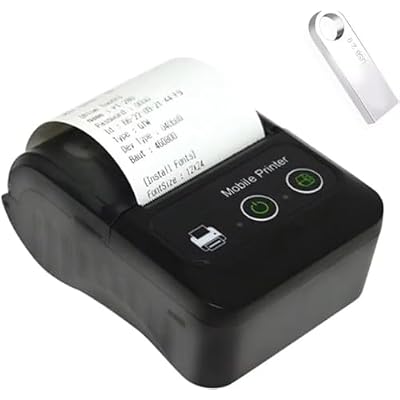
is NOT Compatible with iPhone iOSIPADMAC,ONLY FIT AndroidWindows,Bluetooth Thermal Receipt Printer 58mm,Wireless Portable mini Pocket Invoice Bill
Item #:
83514583
IMP 40
Price Details
Excluding Shipping & Custom charges ( Shipping and custom charges will be calculated on checkout )
*All items will import from US
0 ratings
Write a review
In stock
 Imported from USA store
QTY:
Order now and get it around Wednesday, September 02
Secured transaction
Ubuy works hard to protect your security and privacy. Our advanced payment security system ensures confidentiality by encrypting your information during transmission using AES (Advanced Encryption Standards) and SSL (Secure Socket Layer) protocols. Your payment details are 100% secure as we do not share your payment details with third party sellers.
Our Top Logistics Partners


Small and lightweight, easy to carry, widely used in different places, and compatible with various operating systems including Win/MAC/LINUX/ios/android.

Fast
Shipping

Free
Return*

Secure Packaging

100% Original Products

PCI DSS Compliance

ISO 27001 Certified



Note: Step Down Voltage Transformer required for using electronics products of US store (110-120). Recommended power converters Buy Now.


What Stands Out
Compact Design
This mini pocket printer is lightweight and portable, making it easy for small businesses to print invoices on-the-go without compromising space or convenience.
Wide Compatibility
With support for Android, Windows, and Linux, this printer ensures seamless integration across various systems, enabling smooth operations for diverse business environments.
Wireless Printing
Bluetooth connectivity allows for cord-free operation, enhancing mobility and flexibility for users who need to print receipts at various locations.
Product Details
| Printer Type | Thermal |
| Other Special Features of the Product | 2 inch ticket bill invoice android pocket mini portable thermal direct printer, 58mm receipt printer, bluetooth wireless thermal printing machine (5.1 cm) |
| Printer Output Type | Monochrome |
| Item Dimensions D x W x H | 2"D x 4"W x 3"H (5.1 x 10.2 x 7.6 cm) |
| Controller Type | Android, iOS |
| Print media | Labels |
| Scanner Type | Portable |
| Compatible Devices | Smartphones |
| Ink Color | Black |
| Additional Printer Functions | Print Only |
| Control Method | App |
| Resolution | 203 x 203 DPI |
| Display Type | LCD |
| Color Pages per Minute | 90 |
| B&W Pages per Minute | 90 |
| Color | BLACK |
| Printer Connectivity Type | Bluetooth |
| Hardware Interface | Bluetooth |
| Maximum Copy Resolution Black and White | 203 DPI |
| Brand | GZGYNADAST |
| Model Name | PT280 |
| Model Number | PT280 |
| Built-In Media | printer+U DISK +charger+usb cable+ticket paper+manual instruction |
| Model Series | PT |
| Specific Uses For Product | Receipt Printing |
| UPC | 749664961622 |
| Manufacturer | GZGYNADAST |
| Item Type Name | thermal printer |
| Maximum Media Size | WIdth58MM |
| Maximum Sheet Capacity | 50 |
| Paper Size | 58MM |
| Maximum print Resolution Color | 203 x 203 DPI |
| Maximum Print Resolution Black and White | 203 DPI |
| Dual-sided printing | No |
| Duplex | Simplex |
| Connectivity Technology | Bluetooth |
| Printing Technology | Thermal |
| Special Feature | 2 inch ticket bill invoice android pocket mini portable thermal direct printer, 58mm receipt printer, bluetooth wireless thermal printing machine See more (5.1 cm) |
| Printer Output | Monochrome |
| Maximum Print Speed (Color) | 90 |
| Max Printspeed Monochrome | 90 |
| Product Dimensions (L x W x H) | 2"D x 4"W x 3"H (5.1 x 10.2 x 7.6 cm) |
Who Should Buy?

-
Small Retailers
Ideal for small businesses needing affordable, portable solutions for printing receipts and invoices efficiently.
-
Food Trucks
Great for food trucks that require a compact printer to handle transactions on-the-go and maintain mobility.
-
Market Vendors
Perfect for market vendors who seek convenience and portability, enabling quick printing without traditional equipment.

-
Apple Users
Not suitable for users with iOS, iPad, or Mac devices, limiting compatibility with a significant user base.
Product Description
is NOT Compatible with iPhone iOSIPADMAC,ONLY FIT AndroidWindows,Bluetooth Thermal Receipt Printer 58mm,Wireless Portable mini Pocket Invoice Bill Ticket pos Printer for Small Business
Have any Query? Chat with us
Customer Questions & Answers
-
Question:
What types of businesses can benefit from using a Bluetooth Thermal Receipt Printer 58mm?
Answer: Bluetooth Thermal Receipt Printers are ideal for small businesses such as coffee shops, food trucks, and retail stores. These printers are compact and portable, making them perfect for mobile transactions. By utilizing this printer, businesses can streamline their invoicing process, enhance customer service, and reduce wait times during peak hours. Additionally, their Bluetooth connectivity ensures easy pairing with smartphones or tablets, adding convenience for owners who operate across different locations. -
Question:
How do I connect the Bluetooth Thermal Receipt Printer to my Android device?
Answer: Connecting your Bluetooth Thermal Receipt Printer to your Android device is straightforward. First, ensure your printer is charged and powered on. Next, enable Bluetooth on your Android device and search for available devices. Select your printer from the list of paired devices. Once connected, you can use compatible POS applications available on the Google Play Store to start printing invoices, tickets, or receipts directly from your smartphone or tablet. -
Question:
What type of thermal paper does this printer use?
Answer: The Bluetooth Thermal Receipt Printer typically uses 58mm thermal paper rolls. These rolls are widely available and easy to replace. Using thermal paper eliminates the need for ink, making printing cost-effective while ensuring clear and sharp receipts. Ensure proper installation of the thermal paper to avoid misprints or jams. This type of paper is excellent for printing invoices, tickets, and receipts seamlessly, ensuring that your customers receive professional documentation. -
Question:
Are there any specific Android apps recommended for this printer?
Answer: Yes, various Android apps can enhance your experience with the Bluetooth Thermal Receipt Printer. Apps like 'Bluetooth Print' or 'Escpos' support this printer and provide features tailored for receipts and invoices. These apps allow customization of templates, fonts, and layouts to suit your business's specific needs. Use these tools to create a consistent branding experience, ensuring your receipts reflect your business identity effectively, whether you’re operating a food stall or a boutique. -
Question:
Can I use this printer for printing barcodes or QR codes?
Answer: Absolutely! The Bluetooth Thermal Receipt Printer is capable of printing barcodes and QR codes. This feature is particularly useful for businesses that need to manage inventory or provide customers with digital coupons. Many POS applications that interface with the printer offer easy-to-use barcode formats. By incorporating barcodes or QR codes in your receipts, you improve customer tracking and create an engaging shopping experience that aligns with modern retail practices. -
Question:
What is the printing speed of this Bluetooth printer?
Answer: This Bluetooth Thermal Receipt Printer has a commendable printing speed, which typically ranges from 90mm/s to 120mm/s. This fast output helps in reducing customer wait times, making it a perfect addition for busy environments during peak service hours. With the ability to quickly process transactions, businesses can ensure a smooth operational flow, especially in high-paced settings like cafes or retail counters, where efficiency is crucial. -
Question:
What kind of maintenance does this printer require?
Answer: Maintaining your Bluetooth Thermal Receipt Printer is minimal but crucial for optimal performance. Regularly clean the printer head with a soft cloth to remove dust and residue that may affect print quality. Additionally, ensure that you use the recommended thermal paper to prevent paper jams. It's also wise to check and replace batteries or charging connections as needed. With this simple upkeep, you guarantee longevity and consistent printing output, supporting your small business operations effectively. -
Question:
Is this printer compatible with iOS devices as well?
Answer: While this Bluetooth Thermal Receipt Printer is primarily designed to work seamlessly with Android devices, many models also provide compatibility with iOS devices. It's essential to check the specifications and any accompanying documentation for detailed compatibility information. With proper applications available on the App Store, you can print receipts from iPhones or iPads, making it a versatile tool for small businesses that use multiple types of devices. -
Question:
What are the advantages of using a portable mini pocket printer for small businesses?
Answer: A portable mini pocket printer offers several key advantages for small businesses. Firstly, its compact design allows for mobility, making it easy to print invoices on the go, whether at a customer’s location or during market events. This flexibility can enhance customer satisfaction by providing convenient service. Additionally, its wireless capability reduces cable clutter and allows for seamless integration with various devices, further simplifying transactions in dynamic work environments. -
Question:
Where can I buy Bluetooth Thermal Receipt Printer 58mm, Android Wireless Portable Mini Pocket Invoice Bill Ticket POS Printer for Small Business, Compatible with Isle of Man?
Answer: You can purchase the Bluetooth Thermal Receipt Printer 58mm at Ubuy, which offers a comprehensive selection of this product alongside various accessories. Ubuy provides a user-friendly shopping experience that allows you to browse through product specifications and customer reviews, ensuring you make an informed decision for your small business needs. By shopping at Ubuy, you can also take advantage of their exclusive deals and promotions specifically designed for small businesses in Isle of Man.
GZGYNADAST Printers PT280 Editorial Review
The Bluetooth Thermal Receipt Printer 58mm has garnered mixed reviews from users, particularly regarding connectivity and technical support. While some customers appreciate the printer's functionality and print quality, others have encountered significant hurdles in getting the device to work. Several users with IT backgrounds reported difficulties pairing the printer with their devices, particularly with iOS systems where the printer did not appear as a Bluetooth option. This frustration was compounded by a lack of effective tech support, as responses were deemed unhelpful and repetitive. Additionally, some customers faced issues such as the printer failing to power on or only flashing lights intermittently, leading to a feeling of disappointment and confusion. However, not all feedback has been negative. There are satisfied customers who highlight the printer's good quality and recommend it for small businesses seeking a portable printing solution. The divide in customer experience suggests that while the product has potential, its usability may vary based on individual circumstances and technical compatibility. **
Customer Reviews & Ratings
1 customers ratings
-
5 Star
0%
-
4 Star
100%
-
3 Star
0%
-
2 Star
0%
-
1 Star
0%
Review this product
Share your thoughts with other customers
Pros
- Portable and ideal for small businesses
- Good print quality reported by some users
- Users recommend it for general use
Cons
- Inadequate technical support with generic responses
Platform Trust & Buyer Confidence

MA
Mohammad
Verified buyer
“Excellent quality and original too,when ubuy send original things I will appreciate that ,I very satisfied thank you”
23 July 2026 · via Trustpilot
CK
Chitra
Verified buyer
“The order and delivery progress was communicated very well. Package arrived within the estimated time. Products arrived as expected in good condition.”
22-Jul-26 · via Trustpilot
K
kund
Verified buyer
“Good supply of products. Safe payment methods, and shipment worldwide! Genuine products.”
23-Jul-26 · via Trustpilot
OO
Onesi
Verified buyer
“Was my first time buying a product from Ubuy, but I found it so helpful. This is reliable. Gonna place a new order!”
22 July 2026 · via Trustpilot
SJ
SAO JOHN
Verified buyer
“Ubuy is a great online platform to buy stuff. Reliable, fast delivery time and great value for money. I've been using Ubuy online shopping platform for three years now and will continue to do so.”
23 July 2026 · via Trustpilot
Secure Checkout
Global Delivery
Easy Returns
Genuine Products
Product Price History
Important information
- Limitations : For products shipped internationally, please note that any manufacturer warranty may not be valid; manufacturer service options may not be available; product manuals, instructions, and safety warnings may not be in destination country languages; the products (and accompanying materials) may not be designed in accordance with destination country standards, specifications, and labeling requirements; and the products may not conform to destination country voltage and other electrical standards (requiring use of an adapter or converter if appropriate). The recipient is responsible for assuring that the product can be lawfully imported to the destination country. When ordering from Ubuy or its affiliates, the recipient is the importer of record and must comply with all laws and regulations of the destination country.
- Not all the products listed on Ubuy are for sale, as Ubuy is a global search engine. Products are subject to export/trade regulations.
IMP 40
Order now and get it around Wednesday, September 02
This item is not restrict in my country.(Please click on above link if this item is not restrict in your country, So our team will review and allow.)
QTY:
Secured transaction
PCI DSS compliant and ISO 27001:2022 certified, with encrypted payments and full buyer protection on every order.
Our Top Logistics Partners
Fastest cross-border delivery
Features & Benefits
- Small and lightweight design for easy portability
- Compatible with a variety of operating systems
- Widely used in different places
- Fast printing speed of 90mm/s
- Comes with U disk containing drivers and manuals
- Supports connection via Bluetooth
Ubuy Assurance
Experience worry-free shopping with 100% original products, PCI DSS-compliant payment security, ISO 27001-certified data protection, the fastest cross-border delivery, free returns *, and secure packaging on every order.