- Home Page /
- Office Products /
- Office Electronics /
- Printers & Accessories /
- Computer Printers /
- Inkjet Computer Printers /
- Ink Tank Printers /
- Canon IX6820 Wireless Inkjet Printer, 150Sht ...
0 ratings




Item #:
28117238
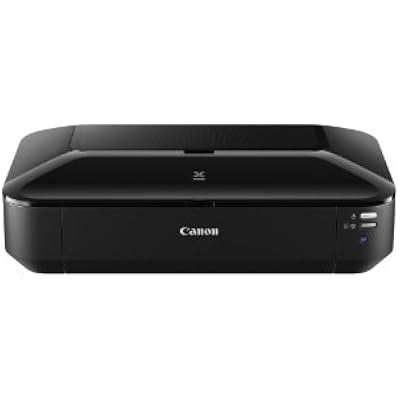
Canon IX6820 Wireless Inkjet Printer, 150Sht Cap, 23-Inch x12-Inch x6-Inch, Black
85% of respondents would recommend this to a friend
Item #:
28117238
IMP 335
Price Details
Excluding Shipping & Custom charges ( Shipping and custom charges will be calculated on checkout )
*All items will import from US
0 ratings
Write a review
In stock
 Imported from USA store
QTY:
Only 1 item left in stock.
Order now and get it around Sunday, July 05
Secured transaction
Ubuy works hard to protect your security and privacy. Our advanced payment security system ensures confidentiality by encrypting your information during transmission using AES (Advanced Encryption Standards) and SSL (Secure Socket Layer) protocols. Your payment details are 100% secure as we do not share your payment details with third party sellers.
Our Top Logistics Partners


Wireless inkjet business printer with exceptional printing detail and amazing color that makes your presentations and documents stand out.

Fast
Shipping

Free
Return*

Secure Packaging

100% Original Products

PCI DSS Compliance

ISO 27001 Certified


Note: Step Down Voltage Transformer required for using electronics products of US store (110-120). Recommended power converters Buy Now.


What Stands Out
Wide Format Printing
Prints documents up to 13 x 19 inches, ideal for professionals seeking high-quality, large prints, catering to graphic designers, photographers, and businesses.
Wireless Connectivity
Seamlessly connects to various devices via Wi-Fi, ensuring hassle-free printing from smartphones, tablets, or computers, enhancing convenience for home and office use.
High Capacity
Supports up to 150 sheets, minimizing interruptions and maximizing productivity for users who frequently print large volumes of documents and presentations.
Product Details
- Sold as 1 EA.
| Printer Type | Inkjet |
| Other Special Features of the Product | Wireless |
| Printer Output Type | Color |
| Item Weight | 24.3 Pounds (11.02 kg) |
| Item Dimensions D x W x H | 23"D x 25.8"W x 6.3"H (58.4 x 65.5 x 16 cm) |
| Controller Type | iOS |
| Print media | Paper (plain) |
| Scanner Type | Photo |
| Maximum Copy Speed Black and White | 14.5 ppm |
| Ink Color | Black |
| Additional Printer Functions | Print Only |
| Control Method | Remote |
| Compatible Cartridge | CLI-251, PGI-250 |
| Number of Trays | 1 |
| Processor Count | 1 |
| Resolution | 9600 x 2400 |
| Number of Licenses | 1 |
| Color | Black |
| Maximum print Resolution Color | 9600 x 2400 |
| Maximum Print Resolution Black and White | 4800 x 1200 |
| Dual-sided printing | Yes |
| Duplex | Manual |
| Brand | Canon |
| Model Name | IX6820 |
| Model Number | 8747B003 |
| Built-In Media | USB Cable, Ethernet Cable, 150-sheet Auto Feeder |
| Model Series | PIXMA |
| Specific Uses For Product | business |
| UPC | 013803230277 |
| Manufacturer | Canon |
| Color Pages per Minute | 10.4 ppm |
| B&W Pages per Minute | 14.5 ppm |
| Maximum Media Size | 13 x 19 inches (33 cm) |
| Maximum Sheet Capacity | 150 |
| Paper Size | 4 inch x 6 Inches (10.2 cm) |
| Output sheet capacity | 150 |
| Printer Connectivity Type | Wireless |
| Hardware Interface | Ethernet |
| Maximum Copy Resolution Color | 9600 x 2400 dpi |
| Maximum Copy Resolution Black and White | 9600 dpi or lower |
| Connectivity Technology | Wireless |
| Printing Technology | Inkjet |
| Special Feature | Wireless |
| Printer Output | Color |
| Maximum Print Speed (Color) | 10.4 ppm |
| Max Printspeed Monochrome | 14.5 ppm |
What's in the box
USB Cable, Ethernet Cable, 150-sheet Auto Feeder
Who Should Buy?

-
Photographers
Ideal for photographers needing high-quality photo prints up to 13x19 inches for portfolios and exhibitions.
-
Small Businesses
Great for small businesses that require versatile printing for marketing materials, reports, and presentation graphics.
-
Students
Perfect for students needing to print large format projects, posters, or presentations in high quality.

-
Heavy Users
Not suitable for heavy users needing frequent printing, as ink costs may mount up quickly.
-
Mobile Workers
Limited portability makes it less ideal for mobile workers who require printing on the go.
-
Budget Shoppers
May not appeal to budget-conscious customers due to higher upfront costs and maintenance expenses.
Product Description
Have any Query? Chat with us
Customer Questions & Answers
-
Question:
What are the main features of the Canon IX6820 Wireless Inkjet Printer?
Answer: The Canon IX6820 is a compact wireless inkjet printer capable of handling up to 150 sheets at a time, and it supports a variety of media sizes up to 13 inches wide. It offers wireless connectivity, allowing you to print directly from your smartphone, tablet, or computer without the need for cords. Its high-quality printing ensures vibrant colors and sharp text, making it ideal for both home and office use, especially for producing professional-quality documents and photos. -
Question:
Is the Canon IX6820 compatible with mobile printing?
Answer: Yes, the Canon IX6820 features compatibility with mobile printing technologies such as Apple AirPrint, Google Cloud Print, and the Canon PRINT app. This allows you to print wirelessly from your smartphones and tablets without needing to install driver software. It's particularly beneficial for users who print on-the-go or need to print presentations, documents, or photos directly from their mobile devices. -
Question:
What types of paper can be used with the Canon IX6820?
Answer: The Canon IX6820 accommodates various paper types including plain paper, photo paper, and envelopes. It can handle specialty media such as glossy or matte photo papers, which are perfect for high-quality photo prints. This versatility makes it suitable for diverse tasks, whether you are printing detailed graphics for presentations or high-resolution photos for framing or sharing. -
Question:
How does the Canon IX6820 perform in terms of print speed?
Answer: The Canon IX6820 boasts impressive print speeds of up to 14.5 pages per minute for black and 10.4 pages per minute for color prints. This efficiency is particularly useful in busy environments where time is of the essence, such as in small offices or for students managing multiple assignments. You'll find that it can quickly produce prints without sacrificing quality. -
Question:
Does the Canon IX6820 support duplex printing?
Answer: The Canon IX6820 does not have automatic duplex printing, which means that you must manually flip the pages to print on both sides. However, you can still achieve double-sided prints by selecting the appropriate settings within your print dialog. This feature allows users to save paper while being more environmentally friendly, making it practical for documents that require double-sided printing, such as reports or presentations. -
Question:
How do I connect the Canon IX6820 to my Wi-Fi network?
Answer: To connect the Canon IX6820 to your Wi-Fi network, use the Canon PRINT app or follow the on-printer setup instructions. You can select your network and enter the password directly on the printer's control panel. This process allows for seamless wireless printing from any compatible device in your home or office. Once connected, you'll enjoy the convenience of printing without being tethered by cables. -
Question:
What print resolutions does the Canon IX6820 offer?
Answer: The Canon IX6820 operates at a maximum print resolution of 4800 x 1200 dpi, which ensures that your printed images are sharp and vivid, contributing to professional-quality results. This high level of detail is ideal for photo enthusiasts and anyone needing to produce high-resolution materials, such as marketing flyers or graphic designs, where clarity is crucial. -
Question:
Can I use third-party ink cartridges with the Canon IX6820?
Answer: While the Canon IX6820 is designed to work optimally with Canon ink cartridges, some users opt for third-party ink as a cost-saving measure. However, using non-genuine inks may affect print quality and could lead to issues with the printer’s functionality. It's advisable for users focused on maintaining the best quality prints to stick with Canon’s recommended cartridges, especially for critical professional tasks. -
Question:
What is the dimension and weight of the Canon IX6820 printer?
Answer: The Canon IX6820 has dimensions of 23 inches in width, 12 inches in depth, and 6 inches in height, making it a compact printer that fits well in various spaces. It weighs approximately 18 pounds, providing a solid build that ensures stability during operation. Its size makes it suited for limited office spaces or home environments where space optimization is a priority. -
Question:
Where can I buy the Canon IX6820 Wireless Inkjet Printer in Isle of Man?
Answer: You can purchase the Canon IX6820 Wireless Inkjet Printer from Ubuy, which offers a wide range of electronics and home office supplies. Ubuy provides a user-friendly shopping experience, along with various options to set up delivery to your location. Shopping on Ubuy ensures you have access to this printer while also experiencing reliable service.
Canon Ink Tank Printers 8747B003 Editorial Review


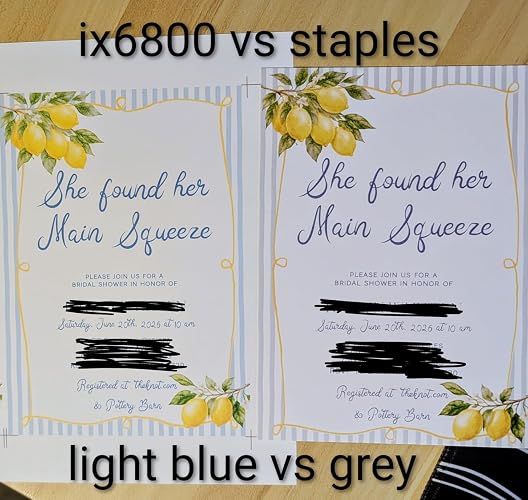
The Canon iX6820 PIXMA Color Wireless Photo Printer is a versatile printer with a 5-cartridge system, Consisting of three thin color cartridges, one thin black cartridge, and one fat black cartridge. It can be used for printing photos, business cards, and even edible prints. While it can be a bit difficult to figure out in the beginning, it is compatible with Apple AirPrint and iPad Pro. However, some customers have reported issues with quality, particularly if the printer has been idle for more than a month. Regular maintenance is required to ensure optimal performance, including running a page through the printer every few days. There have also been complaints about ink smearing and the printer's noise level. Despite these issues, some customers have had success using the printer for screen-printing and oversize prints, while others have found it to be the perfect solution for printing on icing sheets.
Customer Reviews & Ratings
267 customers ratings
-
5 Star
73%
-
4 Star
12%
-
3 Star
6%
-
2 Star
2%
-
1 Star
7%
Review this product
Share your thoughts with other customers
Pros
- Versatile printer with a 5-cartridge system
- Can print on a variety of materials, including cardstock
- Compatible with Apple AirPrint and iPad Pro
- Good for screen-printing and printing on icing sheets
Cons
- Some complaints about ink smearing and noise level
Related Categories
Product Price History
Important information
- Limitations : For products shipped internationally, please note that any manufacturer warranty may not be valid; manufacturer service options may not be available; product manuals, instructions, and safety warnings may not be in destination country languages; the products (and accompanying materials) may not be designed in accordance with destination country standards, specifications, and labeling requirements; and the products may not conform to destination country voltage and other electrical standards (requiring use of an adapter or converter if appropriate). The recipient is responsible for assuring that the product can be lawfully imported to the destination country. When ordering from Ubuy or its affiliates, the recipient is the importer of record and must comply with all laws and regulations of the destination country.
- Not all the products listed on Ubuy are for sale, as Ubuy is a global search engine. Products are subject to export/trade regulations.
IMP 335
Order now and get it around Sunday, July 05
This item is not restrict in my country.(Please click on above link if this item is not restrict in your country, So our team will review and allow.)
QTY:
Only 1 item left in stock.
Secured transaction
Ubuy works hard to protect your security and privacy. Our advanced payment security system ensures confidentiality by encrypting your information during transmission using AES (Advanced Encryption Standards) and SSL (Secure Socket Layer) protocols. Your payment details are 100% secure as we do not share your payment details with third party sellers.
Our Top Logistics Partners
Fastest cross-border delivery
Features & Benefits
- Prints everything from 4 x 6 mailers to 13 x 19 presentation charts
- Five individual ink tanks produce amazing color
- Streamlines productivity with exclusive Solution Templates
- My Image Garden software for convenient printing features
- Connectivity options include Wireless LAN, Ethernet, and Hi-Speed USB
- 150-sheet auto feeder allows for efficient printing