- Home Page /
- Office Products /
- Office Electronics /
- Printers & Accessories /
- Computer Printers /
- Inkjet Computer Printers /
- Ink Tank Printers /
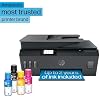
- HP Smart Tank Plus 570 Wireless All-in-One In...
0 ratings




Item #:
186096771
HP Smart Tank Plus 570 Wireless All-in-One Ink Tank Printer with up to 2 Years of Ink Included (5HX14A)
Item #:
186096771
IMP 292
Price Details
Excluding Shipping & Custom charges ( Shipping and custom charges will be calculated on checkout )
*All items will import from US
In stock
 Imported from USA store
QTY:
Order now and get it around Wednesday, June 24
Secured transaction
Ubuy works hard to protect your security and privacy. Our advanced payment security system ensures confidentiality by encrypting your information during transmission using AES (Advanced Encryption Standards) and SSL (Secure Socket Layer) protocols. Your payment details are 100% secure as we do not share your payment details with third party sellers.
Our Top Logistics Partners


Best for low-cost, high-volume printing—up to 2 years of Original HP Ink included.

Fast
Shipping

Free
Return*

Secure Packaging

100% Original Products

PCI DSS Compliance

ISO 27001 Certified


Note: Step Down Voltage Transformer required for using electronics products of US store (110-120). Recommended power converters Buy Now.


What Stands Out
Cost-Saving Ink
Includes up to two years of ink, significantly reducing printing costs and ensuring users stay productive without frequent ink purchases or replacements.
Wireless Convenience
Offers seamless wireless connectivity, enabling users to print, scan, and copy from smartphones, tablets, or computers with ease, enhancing flexibility and accessibility.
Versatile Functionality
As an all-in-one printer, it combines printing, scanning, and copying, making it an ideal choice for home offices and small businesses needing multifunctional capabilities.
Product Details
- SET IT UP ONCE AND PRINT WITH CONFIDENCE. No complicated maintenance. Just easy, reliable printing you can count on.
- INK FOR YEARS. NOT MONTHS. Up to 2 years of ink included. Get thousands of pages of cartridge-free printing. More pages, less hassle
- KEEPS PRINTING WELL AFTER COMPETITORS HAVE QUIT. No complex maintenance. Sharper text, richer colors.[2] Only with HP Smart Tank
- INNOVATION YOU CAN TRUST. Cartridge-free printing that keeps you printing longer with fewer interruptions, powered by the trusted HP innovation you rely on today
- THE LAST PRINTER YOU'LL EVER NEED. Enjoy years of refillable, cartridge-free printing.[
- MESS-FREE REFILL – Replenish ink with HP's easy-access, mess-free refill system. Simply plug the ink bottles into this cartridge-free ink tank and let them drain—no squeezing, no spilling
- KEY FEATURES – Print, copy and scan, plus borderless prints, mobile and wireless printing
- FULLY LOADED WITH SAVINGS – Best for low-cost, high-volume printing—up to 2 years of Original HP Ink included; get up to 8,000 color pages or 6,000 black pages right out of the box
| Printer Type | HP Thermal Inkjet |
| Other Special Features of the Product | Refillable Ink Tank |
| Printer Output Type | Color |
| Item Weight | 13.61 Pounds (6.17 kg) |
| Item Dimensions D x W x H | 14.7"D x 17.7"W x 7.8"H (37.3 x 45 x 19.8 cm) |
| Print media | Envelopes, Glossy photo paper, Paper (plain) |
| Scanner Type | Flatbed |
| Maximum Copy Speed Black and White | 11 ppm |
| Ink Color | Black, Cyan, Magenta, Yellow |
| Additional Printer Functions | All In One |
| Compatible Cartridge | HP 32XL 135-ml Black Original Ink Bottle; HP 31 70-ml Cyan Original Ink Bottle; HP 31 70-ml Magenta Original Ink Bottle; HP 31 70-ml Yellow Original Ink Bottle; |
| Number of Trays | 1 |
| Processor Count | 1 |
| Resolution | 1920 x 1080 |
| Display Type | LED |
| Maximum Media Size | Legal (8.5 x 14 inches) |
| Maximum Sheet Capacity | 100 |
| Paper Size | 8.5 x 11 Inches (21.6 cm) |
| Printer Connectivity Type | Wi-Fi |
| Hardware Interface | Ethernet, HDMI, USB 2.0, USB 3.0, USB Type C |
| Total USB 3.0 Ports | 2 |
| Total Usb Ports | 4 |
| Brand | HP |
| Model Name | Smart Tank 570 |
| Model Number | 570 |
| Built-In Media | 5HX14A HP Smart Tank Plus 570 Wireless All-in-One printer; HP 32XL 135-ml Black Original Ink Bottle; HP 31 70-ml Cyan Original Ink Bottle; HP 31 70-ml Magenta Original Ink Bottle; HP 31 70-ml Yellow Original Ink Bottle; HP Black Printhead; HP Tri-color Printhead; Ink caution flyer; Repacking flyer; Setup guide; Reference guide; Regulatory flyer; Power cord |
| Model Series | Smart Tank |
| Specific Uses For Product | Everyday Use, Student, multimedia |
| Manufacturer | HP |
| Item Type Name | Multifunction Printer |
| Unit Count | 1.0 Count |
| Color Pages per Minute | 5 ppm |
| B&W Pages per Minute | 11 ppm |
| Color | Black |
| Maximum print Resolution Color | 4800 x 1200 dpi |
| Dual-sided printing | No |
| Duplex | Simplex |
| Maximum Copy Resolution Color | 4800 dpi |
| Maximum Copy Resolution Black and White | 4800 dpi |
| Connectivity Technology | Wi-Fi |
| Printing Technology | HP Thermal Inkjet |
| Special Feature | Refillable Ink Tank |
| Printer Output | Color |
| Maximum Print Speed (Color) | 5 ppm |
| Max Printspeed Monochrome | 11 ppm |
What's in the box
5HX14A HP Smart Tank Plus 570 Wireless All-in-One printer; HP 32XL 135-ml Black Original Ink Bottle; HP 31 70-ml Cyan Original Ink Bottle; HP 31 70-ml Magenta Original Ink Bottle; HP 31 70-ml Yellow Original Ink Bottle; HP Black Printhead; HP Tri-color Printhead; Ink caution flyer; Repacking flyer; Setup guide; Reference guide; Regulatory flyer; Power cord
Who Should Buy?

-
Home Offices
Ideal for individuals working from home needing efficient printing, scanning, copying, and reliable wireless connectivity.
-
High Volume Users
Perfect for families or small businesses requiring a lot of printing, with significant ink savings included.
-
Budget-Conscious Buyers
Great choice for users seeking cost-effective printing solutions without the hassle of replacing ink frequently.

-
Frequent Travelers
Not suited for users who need portable printing solutions, as it is designed for stationary use.
-
Photo Printing Enthusiasts
May not meet high-quality color accuracy required for professional-grade photo printing needs.
-
Heavy Duty Users
Not ideal for businesses requiring ultra high-volume or specialized printing capabilities beyond standard functions.
Product Description
Have any Query? Chat with us
Customer Questions & Answers
-
Question:
What features does the HP Smart Tank Plus 651 Wireless All-in-One Printer offer?
Answer: The HP Smart Tank Plus 651 combines versatile functionalities such as printing, scanning, copying, and faxing. One of its standout features is the integrated ink tank system that allows for high-volume printing without the frequent need for cartridge replacements. With mobile connectivity options, you can print effortlessly from your smartphone or tablet, enhancing convenience for home users. The auto document feeder further simplifies multi-page scanning and copying, making it ideal for both personal and small business use. -
Question:
Is the HP Smart Tank Plus 651 suitable for home offices?
Answer: Yes, the HP Smart Tank Plus 651 is designed specifically for home office environments. Its all-in-one functionality allows users to manage all printing, scanning, and copying needs from a single device. The included ink bottles support high-volume printing, which means you can focus on your tasks without worrying about running out of ink often. Additionally, the wireless feature enables convenient printing from various devices, making it easier to stay productive at home. -
Question:
How does the ink tank system work in the HP Smart Tank Plus 651?
Answer: The ink tank system of the HP Smart Tank Plus 651 uses large reservoirs or tanks that can be easily refilled with ink bottles. This design helps reduce the frequency of ink replacement compared to traditional cartridge systems. Users can refill the tanks according to their printing demands, allowing for a cost-effective and high-volume printing experience. This system is particularly beneficial for families or small businesses that have significant printing needs, reducing waste and making upkeep more manageable. -
Question:
Can I print from my smartphone using the HP Smart Tank Plus 651?
Answer: Absolutely! The HP Smart Tank Plus 651 supports mobile printing through various apps and services. You can utilize the HP Smart app for seamless printing directly from your smartphone or tablet, including photos and documents. This convenience allows you to print on-the-go and manage your printer settings easily, ensuring you can maintain productivity even away from your desk or home office. -
Question:
What types of documents can I print with this printer?
Answer: This printer is versatile enough to handle a variety of document types. You can print everything from word documents and spreadsheets to high-quality photographs. Its capability to print in various formats, including A4, A5, and envelopes, makes it suitable for numerous tasks, whether it's for school projects, professional presentations, or personal photos. This flexibility supports a well-rounded home or small office setup, allowing users to cater to diverse printing needs. -
Question:
What maintenance does the HP Smart Tank Plus 651 require?
Answer: Maintaining the HP Smart Tank Plus 651 is straightforward due to its user-friendly design. Regularly check the ink levels and promptly refill them when low to prevent printing interruptions. It’s advisable to clean the print heads occasionally to ensure quality output and prevent clogs. Additionally, simple software updates via the HP Smart app can optimize printer performance and enhance features, keeping your printing experience smooth and efficient. -
Question:
How do I set up the HP Smart Tank Plus 651?
Answer: Setting up the HP Smart Tank Plus 651 is a streamlined process. Start by unboxing the printer and connecting it to a power source. Next, install the ink bottles according to the provided instructions, and load the paper into the tray. Follow the on-screen prompts on the printer’s control panel to complete the Wi-Fi setup, allowing for wireless printing. Lastly, download the HP Smart app on your smartphone to manage print jobs easily and access printer features efficiently. -
Question:
Is the printing speed fast for the HP Smart Tank Plus 651?
Answer: Yes, the HP Smart Tank Plus 651 offers competitive printing speeds, which are essential for productivity. It can print up to 15 pages per minute for black and up to 10 pages per minute for color, making it suitable for both personal and professional use. Quick printing helps reduce downtime, allowing you to complete tasks more efficiently, whether you're printing reports or school assignments on short notice. -
Question:
What kind of print quality can I expect from this printer?
Answer: You can expect excellent print quality from the HP Smart Tank Plus 651. It utilizes advanced ink technology that produces sharp text and vibrant color graphics, suitable for both professional presentations and personal photos. Whether you are printing documents for a meeting or creating a photo album, the print resolution supports clear and detailed output, ensuring that all prints meet high standards for quality. -
Question:
Where can I buy HP Smart Tank Plus 651 Wireless All-in-One Printer, Ink Tank Printer-for-Home Use, up to 2 Years of Ink in Bottles, Auto Document Feeder, Mobile?
Answer: You can buy the HP Smart Tank Plus 651 from Ubuy in Isle of Man. Ubuy provides a seamless shopping experience and often features various options for purchasing, making it easy for you to obtain this printer along with your ink supplies. Whether you're looking for a reliable delivery service or additional options, Ubuy is a great place to enhance your home office setup.
HP Ink Tank Printers 570 Editorial Review


The HP All-in-One Desktop has provoked a diverse range of customer experiences, with users expressing both enthusiasm and frustration regarding its features and overall functionality. On the positive side, many users have praised the printer’s ease of installation and setup process, which is facilitated by clear, step-by-step instructions. Customers have highlighted the vibrant print quality and the convenience of visible ink levels along with easy ink refilling. The touch screen control panel has also been well-received, making navigation simple. The ability to print directly from mobile devices and the dual-sided printing option add to the printer's versatility, particularly appreciated by users involved in hobbies that require high-quality prints. Conversely, there are significant critiques regarding durability and user-friendliness. Several customers have found the Construction quality to be subpar, often describing it as flimsy. Issues with print head installation have resulted in disappointment, as the design makes it hard to insert cartridges without risking damage. Connectivity problems have also been a common complaint, primarily due to requirements for specific router settings, which can be daunting for those without technical expertise. Instances of paper jams and confusing error messages further exacerbate user frustration, with some customers feeling ill-prepared to troubleshoot these unexpected issues. Overall, while the HP All-in-One Desktop offers appealing features and quality printing for certain users, the inConsistencies and Construction quality may deter potential buyers who seek reliability and a hassle-free experience. **
Customer Reviews & Ratings
2323 customers ratings
-
5 Star
61%
-
4 Star
10%
-
3 Star
7%
-
2 Star
5%
-
1 Star
17%
Review this product
Share your thoughts with other customers
Pros
- Easy installation process with clear, practical instructions
- High-quality print output with vibrant colors
- Convenient touch screen control panel
- Visible and easy ink refill system
- Capability to print directly from mobile devices
Cons
- Flimsy Construction quality
Product Price History
Important information
- Limitations : For products shipped internationally, please note that any manufacturer warranty may not be valid; manufacturer service options may not be available; product manuals, instructions, and safety warnings may not be in destination country languages; the products (and accompanying materials) may not be designed in accordance with destination country standards, specifications, and labeling requirements; and the products may not conform to destination country voltage and other electrical standards (requiring use of an adapter or converter if appropriate). The recipient is responsible for assuring that the product can be lawfully imported to the destination country. When ordering from Ubuy or its affiliates, the recipient is the importer of record and must comply with all laws and regulations of the destination country.
- Not all the products listed on Ubuy are for sale, as Ubuy is a global search engine. Products are subject to export/trade regulations.
IMP 292
Order now and get it around Wednesday, June 24
This item is not restrict in my country.(Please click on above link if this item is not restrict in your country, So our team will review and allow.)
QTY:
Secured transaction
Ubuy works hard to protect your security and privacy. Our advanced payment security system ensures confidentiality by encrypting your information during transmission using AES (Advanced Encryption Standards) and SSL (Secure Socket Layer) protocols. Your payment details are 100% secure as we do not share your payment details with third party sellers.
Our Top Logistics Partners
Fastest cross-border delivery
Features & Benefits
- High-capacity, refillable tank printer for seamless home printing.
- Includes up to 2 years of Original HP Ink—print up to 8,000 color pages.
- Versatile functionality with print, copy, and scan features.
- Fast wireless connectivity with dual-band Wi-Fi for reliable connections.
- User-friendly design with a touchscreen and spill-free ink refill system.
- Ideal solution for families needing affordable, high-volume printing.