- Home Page /
- Electronics /
- Computer Accessories /
- Computer Components /
- Computer Screws /
- Odyson - Airport Card/SSD Screw (Torx T5) Rep...
0 ratings

Item #:
17504243
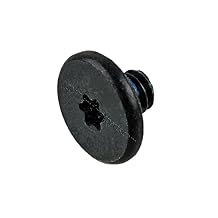
Odyson - Airport Card/SSD Screw (Torx T5) Replacement for Apple MacBook Air 11" A1370 A1465, 13" A1369 A1466 (Late 2010-Early 2015)
Item #:
17504243
IMP 6
Price Details
Excluding Shipping & Custom charges ( Shipping and custom charges will be calculated on checkout )
*All items will import from US
0 ratings
Write a review
In stock
 Imported from USA store
QTY:
Order now and get it around Sunday, August 02
Secured transaction
Ubuy works hard to protect your security and privacy. Our advanced payment security system ensures confidentiality by encrypting your information during transmission using AES (Advanced Encryption Standards) and SSL (Secure Socket Layer) protocols. Your payment details are 100% secure as we do not share your payment details with third party sellers.
Our Top Logistics Partners


Compatible with MacBook Air and MacBook Pro models

Fast
Shipping

Free
Return*

Secure Packaging

100% Original Products

PCI DSS Compliance

ISO 27001 Certified


Note: Step Down Voltage Transformer required for using electronics products of US store (110-120). Recommended power converters Buy Now.


What Stands Out
Precision Fit
Designed specifically for MacBook Air models A1370, A1465, A1369, and A1466, ensuring a perfect fit that easily accommodates screws without damaging the device.
Durable Quality
Made from high-quality materials, these Torx T5 screws provide exceptional durability, ensuring they won't strip or break under pressure, enhancing the longevity of your MacBook.
Easy Installation
Effortless to install, these replacement screws simplify the process of upgrading or repairing your MacBook Air, saving you time and frustration while maintaining device integrity.
Product Details
| Country of Origin | This item will be imported from US |
| Item Weight | 0.1 lbs (50 grams) |
| What is in the box | Odyson - Airport Card/SSD... For more details, please check description/product details |
Who Should Buy?

-
DIY Laptop Repair
Ideal for DIY enthusiasts looking to upgrade or replace SSDs in MacBook Air models from 2010 to 2015.
-
Apple Repair Technicians
Essential for technicians who frequently service MacBook Air models, ensuring they have the right screws for repair tasks.
-
Upgrade Enthusiasts
Perfect for users planning to enhance performance through SSD upgrades, requiring specific screws for installation.

-
Casual Users
Not suitable for casual users who don’t perform hardware upgrades or repairs on their MacBook Air laptops.
-
Non-Apple Devices
Incompatible with non-Apple laptops, making it unnecessary for users of different brands or models.
-
Inexperienced Individuals
Not recommended for individuals without technical skills, as using the wrong screw could damage components.
Product Description
Odyson - Airport Card/SSD Screw (Torx T5) Replacement for Apple MacBook Air 11" A1370 A1465, 13" A1369 A1466 (Late 2010-Early 2015)
About This Item
Upgrade your MacBook Air's airport card or SSD with the Odyson Airport Card/SSD Screw Torx T5 Replacement! This screw set is compatible with MacBook Air models from 2010 to 2015, ensuring a perfect fit for your device. Whether you're looking to repair or upgrade your MacBook Air, this screw set has got you covered. It includes one AirPort card/SSD screw, which is essential for securing your airport card or SSD in place. With its Torx T5 design, this screw set provides a secure and reliable connection for your airport card or SSD. Say goodbye to loose screws and hello to a stable and efficient MacBook Air. Compatible with MacBook Air models A1370, A1465, A1369, and A1466, this screw set is versatile and easy to install.
It's perfect for those who want to replace their existing airport card or SSD or for those looking to upgrade their MacBook Air's performance. Don't let a faulty or outdated airport card or SSD hold you back. Upgrade your MacBook Air with the Odyson Airport Card/SSD Screw Torx T5 Replacement and experience enhanced performance and reliability. Key Features: - Compatible with various MacBook Air models from 2010 to 2015 - Includes one AirPort card/SSD screw for secure installation - Torx T5 design for a reliable connection - Versatile and easy to install - Enhance your MacBook Air's performance and reliability If you're in need of a replacement airport card/SSD screw for your MacBook Air, look no further. The Odyson Airport Card/SSD Screw Torx T5 Replacement is here to meet your needs.
Upgrade your MacBook Air today and enjoy a seamless computing experience.
Have any Query? Chat with us
Customer Questions & Answers
-
Question:
What is the Odyson Airport CardSSD Screw Torx T5 used for?
Answer: The Odyson Airport CardSSD Screw Torx T5 is specifically designed for securing the SSD on Apple MacBook Air models 11" (A1370, A1465) and 13" (A1369, A1466) from late 2010 to early 2015. This screw is essential for ensuring the stability and proper functioning of the SSD. Without the correct screws, your SSD may become loose, leading to potential hardware malfunctions or data accessibility issues. -
Question:
How do I install the Odyson screw on my MacBook Air?
Answer: To install the Odyson screw, first, ensure your MacBook Air is powered off and unplugged. Using a Torx T5 screwdriver, gently remove the existing SSD cover if present. Align the Odyson screw with the designated hole on the SSD and carefully tighten it without overtightening, as this might damage the SSD or the mounting point. Proper installation is crucial for maintaining the performance and security of your SSD. -
Question:
Is the Odyson screw compatible with all MacBook Air models?
Answer: The Odyson screw is specifically compatible with MacBook Air models A1370, A1465 (11") and A1369, A1466 (13") produced between late 2010 and early 2015. It’s important to use the correct screw for your specific model to ensure a proper fit and function. Using an incompatible screw might not only lead to improper installation but can also risk hardware damage. -
Question:
Do I need any special tools to use the Odyson screw?
Answer: Yes, the installation of the Odyson screw requires a Torx T5 screwdriver, which is a specialized tool for working with this type of screw. Using the correct tool ensures that you can comfortably fit and remove the screw while minimizing the risk of stripping it. Having the right tools on hand will make the installation process smoother and more efficient. -
Question:
Can I use the Odyson screw in other devices or brands?
Answer: The Odyson screw is designed specifically for certain models of the Apple MacBook Air and is not recommended for use in other devices or brands. Different laptop manufacturers have varying screw designs and dimensions, so using screws outside their specific applications could lead to improper fitment or functionality issues. -
Question:
What happens if I lose my existing MacBook Air SSD screw?
Answer: If you lose the existing SSD screw for your MacBook Air, it is crucial to replace it to ensure your SSD is properly secured. Failing to replace a missing screw can lead to the SSD becoming loose over time, which may result in system instability and data loss. The Odyson screw is a reliable replacement that ensures your SSD is safely mounted. -
Question:
Where can I buy the Odyson Airport CardSSD Screw Torx T5?
Answer: You can buy the Odyson Airport CardSSD Screw Torx T5 from Ubuy. They offer a convenient online shopping experience and ensure that you have access to the right components for your MacBook Air. Simply visit their website, search for the product, and follow the purchasing process to have your replacement screw delivered. -
Question:
What materials are used in the Odyson screw?
Answer: The Odyson Airport CardSSD Screw is made from durable materials designed to withstand the rigors of typical usage in high-performance laptops. The metal composition provides excellent strength and resistance to wear, ensuring that the screw retains its integrity over time. This durability helps maintain the SSD's secure placement, contributing to the overall stability of your device. -
Question:
Is the Odyson screw suitable for DIY repairs?
Answer: Yes, the Odyson screw is ideal for DIY repairs, especially for users comfortable with basic computer hardware maintenance. Replacing an SSD screw is a straightforward task that many tech enthusiasts can perform with minimal tools. Just make sure to follow safety precautions, like grounding yourself to prevent static damage to sensitive components during the installation process. -
Question:
Can I find installation guides for the Odyson screw online?
Answer: Yes, there are many online resources and video tutorials available that guide you through the process of replacing the SSD screw in your MacBook Air. These guides provide step-by-step instructions, ensuring that even those with limited technical experience can follow along. Utilizing these resources can help you feel more confident in completing the installation successfully.
Odyson Computer Screws Editorial Review
No editorial reviews found
Customer Reviews & Ratings
1 customers ratings
-
5 Star
100%
-
4 Star
0%
-
3 Star
0%
-
2 Star
0%
-
1 Star
0%
Review this product
Share your thoughts with other customers
Platform Trust & Buyer Confidence

MT
Mohd
Verified buyer
“The product received very good packaging & safe…Thank You”
16 June 2026 · via Trustpilot
SJ
Shawati
Verified buyer
“Accurate delivery timing given”
16 June 2026 · via Trustpilot
YB
Youcef
Verified buyer
“Not madly expensive like I thought, and much quicker than promised.”
15 June 2026 · via Trustpilot
LM
Leila
Verified buyer
“Never dealt with Ubuy before, but everything worked out great. Seamless cross border purchasing and shipping. Thanks!”
6/7/2026 · via Trustpilot
KA
Kwame
Verified buyer
“The process was smooth, with clear communication and timelines. This was my 1st purchase and I am really impressed. I will definitely be coming back.”
12 June 2026 · via Trustpilot
Secure Checkout
Global Delivery
Easy Returns
Genuine Products
Product Price History
Important information
- Limitations : For products shipped internationally, please note that any manufacturer warranty may not be valid; manufacturer service options may not be available; product manuals, instructions, and safety warnings may not be in destination country languages; the products (and accompanying materials) may not be designed in accordance with destination country standards, specifications, and labeling requirements; and the products may not conform to destination country voltage and other electrical standards (requiring use of an adapter or converter if appropriate). The recipient is responsible for assuring that the product can be lawfully imported to the destination country. When ordering from Ubuy or its affiliates, the recipient is the importer of record and must comply with all laws and regulations of the destination country.
- Not all the products listed on Ubuy are for sale, as Ubuy is a global search engine. Products are subject to export/trade regulations.
IMP 6
Order now and get it around Sunday, August 02
This item is not restrict in my country.(Please click on above link if this item is not restrict in your country, So our team will review and allow.)
QTY:
Secured transaction
PCI DSS compliant and ISO 27001:2022 certified, with encrypted payments and full buyer protection on every order.
Our Top Logistics Partners
Fastest cross-border delivery
Features & Benefits
- Compatible with various MacBook Air and MacBook Pro models
- Includes AirPort card/SSD screw
- Identifying Numbers: 922-9651, 923-0161
Ubuy Assurance
Experience worry-free shopping with 100% original products, PCI DSS-compliant payment security, ISO 27001-certified data protection, the fastest cross-border delivery, free returns *, and secure packaging on every order.